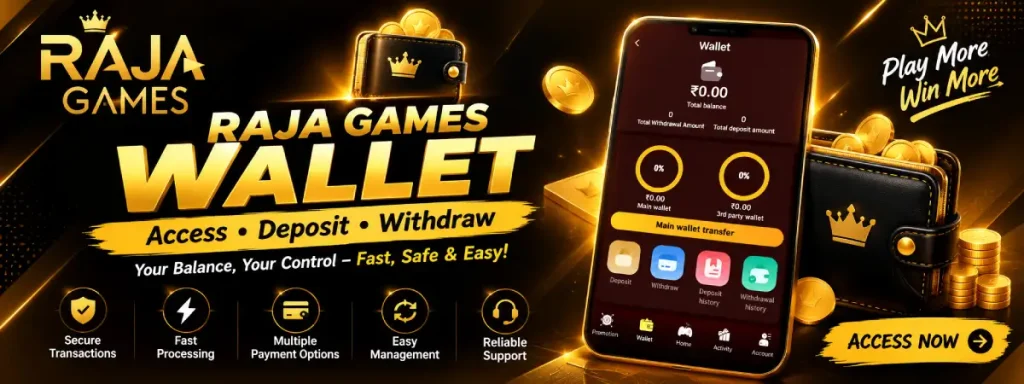
The Raja Game Wallet is the section used to view your available balance, manage deposits, check transaction history, transfer funds between supported wallet sections, and access withdrawal options. Based on the wallet interface shown in the app screenshots, users can find separate options for Deposit, Withdraw, Deposit History, and Withdrawal History from the main Wallet screen.
The exact payment methods, limits, processing times, eligibility requirements, and available services can change, so users should always check the information displayed in their account before completing a transaction.
What Is the Raja Game Wallet?
The Raja Game Wallet works as the account’s central balance-management area. The main wallet screen displays the Total Balance, Total Withdrawal Amount, and Total Deposit Amount.
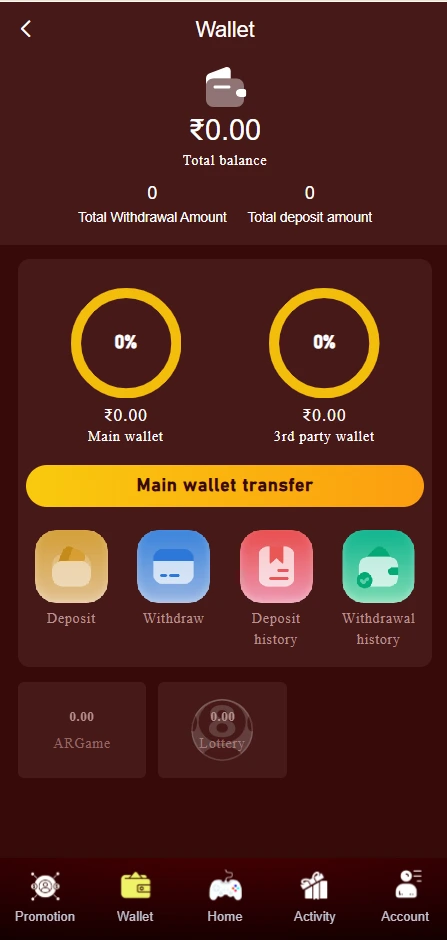
The interface also separates funds into areas such as:
- Main Wallet
- 3rd Party Wallet
- ARGame
- Lottery
- Deposit
- Withdraw
- Deposit History
- Withdrawal History
A Main Wallet Transfer option is also visible, allowing users to manage eligible funds between supported wallet sections when the platform permits it.
This makes the wallet useful for checking your account balance and accessing the different financial functions without navigating through multiple sections.
How to Access Raja Game Wallet?
To access the wallet, log in to your Raja Game account and select the Wallet option from the navigation menu.
The wallet interface shown in the screenshot includes five main navigation options at the bottom:
- Promotion
- Wallet
- Home
- Activity
- Account
Tap Wallet to open the wallet dashboard. From there, you can check your balance and select the required service.
If the wallet page does not load correctly, check your internet connection, refresh the page, or reopen the platform. Avoid sharing your password, OTP, PIN, or payment credentials with anyone claiming to provide wallet support.
Raja Game Wallet Deposit Funds
The deposit section is designed for adding funds to the account using the payment channels displayed by the platform.
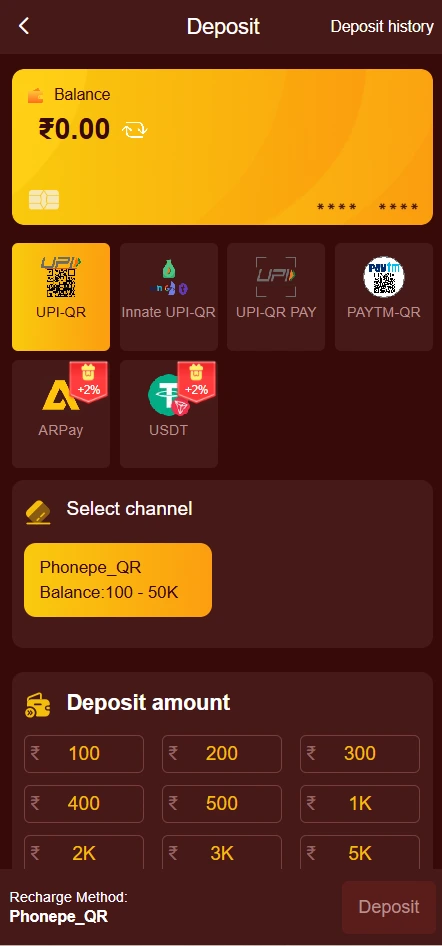
In the supplied screenshot, the Deposit page shows several available payment options, including:
- UPI-QR
- Innate UPI-QR
- UPI-QR PAY
- PAYTM-QR
- ARPay
- USDT
The available options may vary by account, location, time, or platform configuration. Therefore, users should select only a payment method that is actually displayed in their account.
How to Deposit Funds?
A typical deposit flow shown by the interface is:
Step 1: Open the Wallet section.
Step 2: Select Deposit.
Step 3: Choose an available payment channel.
Step 4: Select or enter the required deposit amount.
Step 5: Follow the payment instructions shown on the screen.
Step 6: Confirm the transaction and check Deposit History afterward.
The screenshot displays preset amounts including ₹100, ₹200, ₹300, ₹400, ₹500, ₹1K, ₹2K, ₹3K, and ₹5K. These should be treated as the amounts visible in the supplied interface, rather than a permanent deposit schedule.
For example, the selected channel shown in the screenshot is Phonepe_QR, with a displayed balance range of 100–50K. Payment channels and limits can change, so users should rely on their current wallet screen.
Raja Game Wallet Withdrawal
The Raja Game Wallet withdrawal section provides access to available withdrawal methods and displays the balance that can potentially be withdrawn.
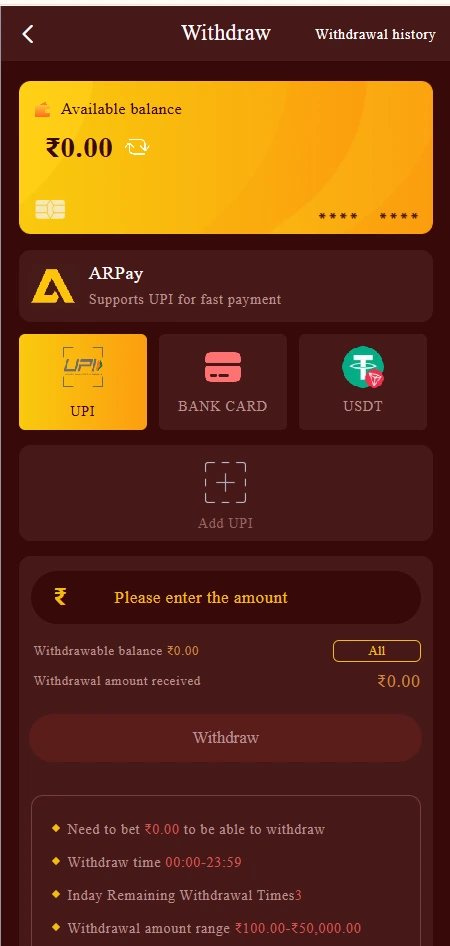
In the supplied withdrawal screenshot, the page displays ARPay and states that it supports UPI for fast payment. Available withdrawal methods shown include:
- UPI
- Bank Card
- USDT
There is also an Add UPI option for users who need to add or select a UPI destination, subject to the platform’s requirements.
How to Make a Raja Game Withdrawal
The general process shown by the interface is:
- Open Wallet.
- Select Withdraw.
- Check the available balance.
- Choose a supported withdrawal method.
- Add or select the required payment details.
- Enter the withdrawal amount.
- Review the displayed amount and conditions.
- Select Withdraw if the transaction is eligible.
Before confirming, carefully check the receiving account or payment details. A wrong payment address or account detail may cause transaction problems.
Raja Game Wallet Withdrawal Limit
The supplied screenshot displays a withdrawal amount range of ₹100.00–₹50,000.00. It also shows additional conditions, including a displayed betting requirement and withdrawal timing information.
Because these values are shown inside the current interface, they should not be treated as permanent terms. The Raja Game withdrawal limit may depend on the current account rules, payment method, verification status, available balance, and platform conditions.
Users should therefore check the withdrawal page immediately before submitting a request.
Withdrawal Requirements and Timing
The withdrawal screen in the supplied screenshot displays several account conditions. It shows:
- A displayed requirement related to betting before withdrawal
- Withdrawal time shown as 00:00–23:59
- 3 remaining withdrawal times displayed
- A displayed withdrawal range of ₹100–₹50,000
These are interface-specific details and may change.
If a withdrawal is unavailable, users should first check whether the account has met the displayed requirements. They should also verify the available balance and selected payment method.
Deposit and Withdrawal History
The wallet interface provides separate history options for both types of transactions.
Deposit History
Deposit History can help users review previous recharge transactions. Checking this section is useful when a payment has been completed but the wallet balance has not updated immediately.
Withdrawal History
Withdrawal History can be used to review submitted withdrawal transactions and their available status or records.
Keeping track of transaction history can help users identify duplicate transactions, pending payments, incorrect amounts, or other account-related issues.
Main Wallet and Third-Party Wallet
Main Wallet: This is the primary balance area displayed on the wallet dashboard.
3rd Party Wallet: This represents another wallet balance shown separately within the platform interface.
The Main Wallet Transfer button provides a way to manage eligible funds between supported wallet sections. The exact transfer rules depend on the platform’s current configuration.
The screenshot also shows separate ARGame and Lottery sections. Their displayed balances can be different from the main wallet balance.
What to Check Before Using Raja Game Wallet?
Before depositing or requesting a withdrawal, users should review:
- Current deposit and withdrawal limits
- Available payment methods
- Required account verification
- Any displayed wagering or turnover requirements
- Transaction fees, if applicable
- Processing times
- Minimum and maximum transaction amounts
- Current platform terms
- Local laws and eligibility requirements
Never send money to an account or payment address supplied outside the platform’s displayed payment process.
Raja Game Wallet Safety Tips
Wallet transactions involve financial risk, so basic precautions are important.
Use your own account and verify payment details before confirming a transaction. Never share your password, OTP, UPI PIN, bank-card information, or account credentials with another person.
Also avoid using unofficial payment links or instructions received through random social-media accounts. If a transaction appears unusual, keep the transaction reference and contact the platform through its available support channel.
Promotional balances, bonuses, rebates, or game-related funds may also have separate terms. A displayed balance should not automatically be interpreted as guaranteed withdrawable cash.
Short Steps to Access Raja Game Wallet
Access Wallet → Check Balance → Choose Deposit or Withdraw → Select Payment Method → Enter Amount → Review Requirements → Confirm Transaction → Check Transaction History
FAQs About Raja Game Wallet
1. What is Raja Game Wallet?
Raja Game Wallet is the account section where users can view their balance and access deposit, withdrawal, transfer, deposit-history, and withdrawal-history functions.
2. How can I access Raja Game Wallet?
Log in to your account and select Wallet from the platform navigation menu. The wallet dashboard then provides access to the available account-management options.
3. How do I deposit funds into Raja Game Wallet?
Open Wallet → Deposit, select an available payment channel, choose or enter the deposit amount, and follow the payment instructions displayed on the screen.
4. Which deposit methods are shown in Raja Game Wallet?
The supplied interface shows UPI-QR, Innate UPI-QR, UPI-QR PAY, PAYTM-QR, ARPay, and USDT. Available methods can vary, so check your current account.
5. What is the Raja Game Wallet withdrawal limit?
The supplied withdrawal screen displays ₹100 to ₹50,000 as the withdrawal amount range. Current limits may change depending on account and platform conditions.
6. How can I request a Raja Game Wallet withdrawal?
Open Wallet → Withdraw, select a supported method such as UPI, Bank Card, or USDT, enter the eligible amount, review the displayed requirements, and submit the request.
7. Why can’t I withdraw my Raja Game Wallet balance?
A withdrawal may be unavailable because of an insufficient eligible balance, displayed wagering requirements, account restrictions, verification requirements, payment-method issues, or other current platform conditions.
8. Where can I check my Raja Game deposit?
Open the Wallet section and select Deposit History to review available deposit records.
9. Where can I check my Raja Game withdrawal?
Select Withdrawal History from the Wallet section to review your available withdrawal records.
10. Does Raja Game Wallet guarantee successful withdrawals?
No. A wallet screen or displayed balance does not guarantee a successful or immediate withdrawal. Eligibility, account conditions, payment processing, and current platform rules can affect transactions.
11. Can I transfer funds between wallet sections?
The supplied wallet interface includes a Main Wallet Transfer option and separate wallet areas. Whether a particular transfer is available depends on the current account and platform rules.
12. Is Raja Game Wallet available for users in India?
The supplied interface includes INR amounts and Indian payment options such as UPI and Paytm-QR. However, availability and legality can depend on the user’s location and applicable laws, so users should verify current local requirements before participating.