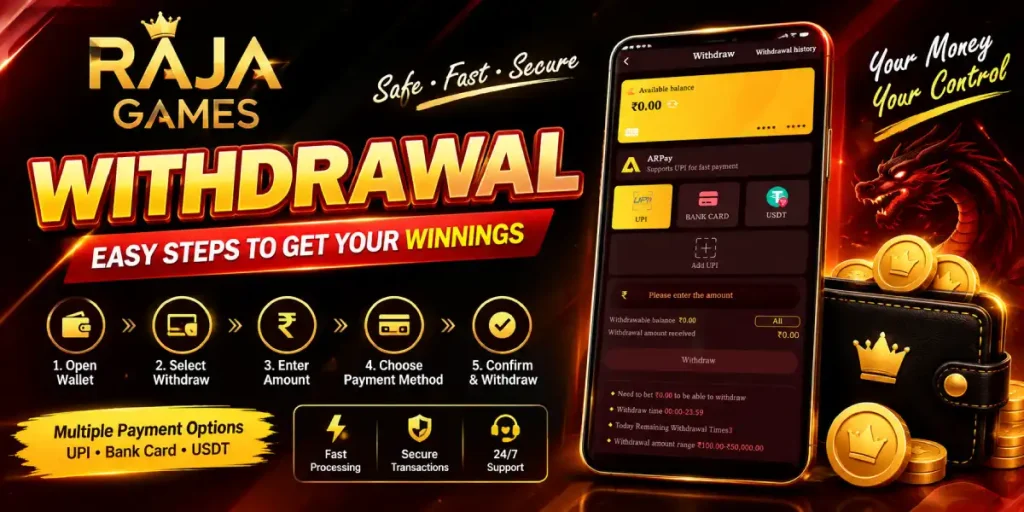
Withdrawing funds from the Raja Game wallet starts from the Wallet section, where users can check their available balance, select a withdrawal method, enter an amount, and review the displayed withdrawal conditions before submitting a request.
Based on the Raja Game interface shown in the supplied screenshots, the wallet includes separate Withdraw, Withdrawal History, and balance-management options. The withdrawal screen also displays important information such as the available balance, withdrawal amount, withdrawal timing, remaining withdrawal attempts, and the applicable amount range.
This guide explains the Raja Game Withdrawal Process using the platform interface shown in the screenshots.
Important: Payment methods, limits, eligibility requirements, and withdrawal conditions can change. Always follow the information currently displayed in your own Raja Game account before submitting a transaction.
How to Access the Raja Game Withdrawal Section?
First, log in to your Raja Game account.
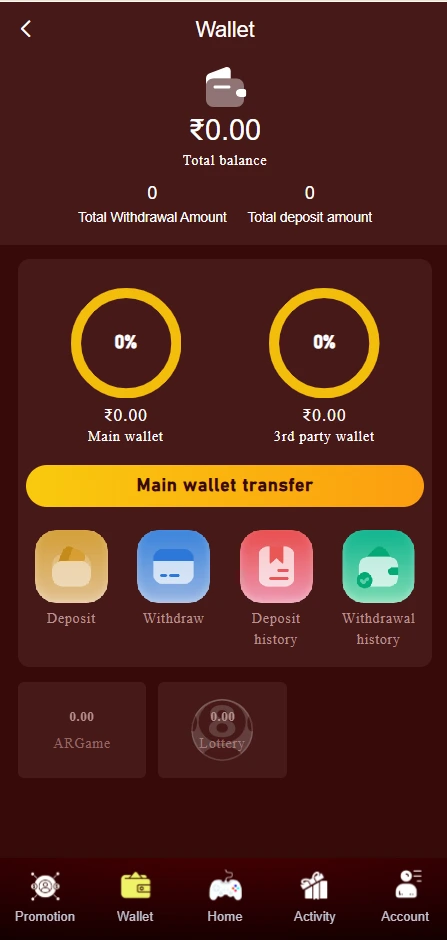
From the main interface, the bottom navigation includes options such as Promotion, Wallet, Home, Activity, and Account.
To begin a withdrawal:
Login → Wallet → Withdraw
The Wallet page shown in the screenshot displays your Total Balance, Total Withdrawal Amount, and Total Deposit Amount. It also provides separate buttons for:
- Deposit
- Withdraw
- Deposit History
- Withdrawal History
Tap Withdraw to open the withdrawal page.
Step 1: Check Your Available Balance
Before entering a withdrawal amount, check the balance displayed on the withdrawal page.
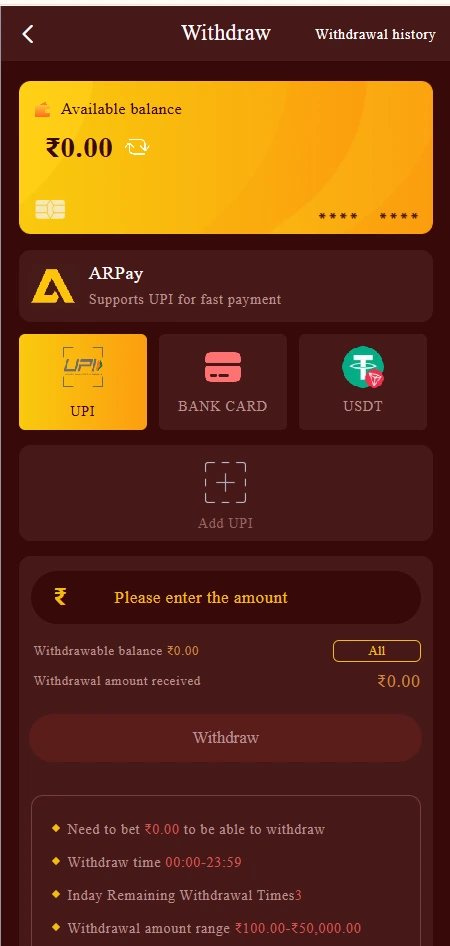
The interface shows an Available Balance section at the top. This is important because the amount you request must be supported by your eligible balance and any applicable account requirements.
For example, one of the supplied screenshots shows:
Available Balance: ₹0.00
The same screen displays ₹0.00 as the withdrawable balance.
If your available balance is insufficient, the platform may prevent you from submitting the withdrawal request.
Why is checking the balance important?
A wallet may show different figures for:
- Total balance
- Main wallet
- Third-party wallet
- Withdrawable balance
Therefore, don’t assume that every displayed balance is immediately available for withdrawal.
Step 2: Select a Withdrawal Method
The Raja Game withdrawal interface shown in the screenshots provides payment-method options.
The displayed withdrawal methods include:
- UPI
- Bank Card
- USDT
The interface also shows ARPay, with text indicating support for UPI payments.
The methods available to you may depend on your account and the current platform configuration.
Choose the payment method that is actually available on your withdrawal screen.
Add UPI Details When Required
The withdrawal interface also includes an Add UPI option.
If you are using UPI and the platform requires you to add payment details, make sure the information is correct before continuing.
Double-check the destination details before confirming a transaction. Incorrect bank or UPI information can create payment problems.
Step 3: Enter Your Withdrawal Amount
After selecting a payment method, enter the amount you want to withdraw.
The supplied screenshot shows a withdrawal amount range of:
₹100.00 – ₹50,000.00
This means the interface currently displays ₹100 as the minimum and ₹50,000 as the maximum for the shown withdrawal configuration.
However, this should not be treated as a permanent limit. The amount range may change according to the platform’s current rules, account status, payment channel, or other conditions.
Example
If your eligible balance allows a ₹2,000 withdrawal, enter:
₹2,000
The screen may then calculate or display the expected Withdrawal Amount Received.
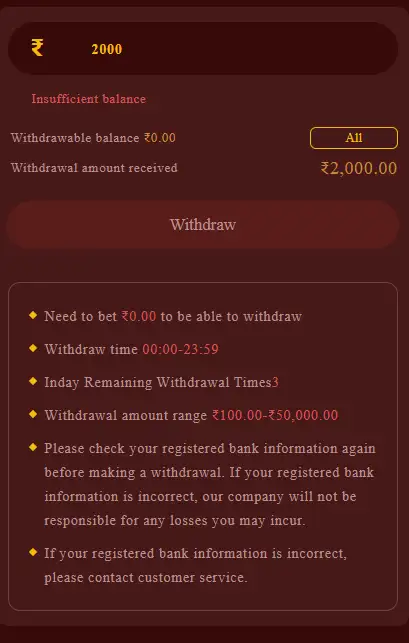
One of your supplied screenshots shows a ₹2,000 amount entered while the account had insufficient balance. This demonstrates why users should check their withdrawable balance before submitting a request.
Step 4: Check the Withdrawal Conditions
Before clicking Withdraw, carefully read the conditions displayed underneath the withdrawal amount.
The supplied interface shows several important points.
Betting Requirement
The screenshot displays:
“Need to bet ₹0.00 to be able to withdraw”
The exact value shown can vary according to the account. Users should check the current requirement displayed on their own screen.
Withdrawal Time
The interface displays:
Withdrawal time: 00:00–23:59
This indicates the withdrawal window shown by the current interface.
Remaining Withdrawal Times
The screenshot displays:
Today Remaining Withdrawal Times: 3
This is another account-specific/platform-specific value that may change.
Withdrawal Amount Range
The displayed range is:
₹100.00–₹50,000.00
Again, verify the current range before making a request.
Step 5: Verify Your Bank or Payment Information
The withdrawal screen contains an important warning asking users to check their registered bank information before making a withdrawal.
This is an important step.
Before submitting:
- Check the registered payment details.
- Confirm that the information belongs to you.
- Check the UPI/bank details carefully.
- Correct outdated information if the platform allows it.
- Contact customer service if you cannot update incorrect information.
Do not submit a withdrawal using payment details that you have not verified.
Step 6: Submit the Withdrawal Request
Once you have checked:
- Available balance
- Withdrawal method
- Withdrawal amount
- Payment details
- Withdrawal requirements
- Current limits
you can select the Withdraw button.
If the account meets the displayed requirements, the request can proceed according to the platform’s current transaction process.
If the button is unavailable or the screen displays an error such as Insufficient balance, don’t repeatedly submit the same request. First identify the reason shown on the screen.
How to Check Raja Game Withdrawal Status?
After submitting a withdrawal, you can use the Withdrawal History option shown in the Wallet section.
The Wallet interface provides separate history options for deposits and withdrawals.
Withdrawal History Can Help You Check:
- Previous withdrawal requests
- Transaction records
- Submitted amounts
- Available transaction status
- Past withdrawal activity
If your transaction does not appear immediately, allow the platform time to update the transaction record and check the history section again.
Common Raja Game Withdrawal Problems
1. Insufficient Balance
One screenshot supplied for this guide clearly shows:
“Insufficient balance”
This can happen when the requested amount is higher than the available eligible balance.
Solution: Check the available/withdrawable balance and enter an amount supported by the account.
2. Withdrawal Button Is Not Working
If the Withdraw button cannot be used, check:
- Available balance
- Required account conditions
- Payment information
- Minimum withdrawal amount
- Maximum withdrawal amount
- Any displayed betting/turnover requirement
The current interface should be treated as the primary source for these requirements.
3. Bank or UPI Information Is Incorrect
Incorrect payment information can cause withdrawal problems.
Review your registered information before submitting the request. If the information cannot be changed from the wallet, contact the platform’s available customer support.
4. Withdrawal Is Pending
A withdrawal may not appear as completed immediately.
First check Withdrawal History and look for the current transaction status. Avoid creating repeated withdrawal requests for the same amount while an earlier request is still being processed.
5. Withdrawal Amount Is Outside the Allowed Range
The supplied interface currently displays:
₹100–₹50,000
If you enter an amount outside the displayed range, the transaction may not be accepted.
Always use the current amount range shown in your account rather than relying on an old screenshot or guide.
Raja Game Withdrawal Process – Quick Summary
The complete process can be summarized as:
Login → Wallet → Withdraw → Check Available Balance → Select Payment Method → Add/Verify Payment Details → Enter Amount → Check Withdrawal Conditions → Submit → Check Withdrawal History
This gives users a straightforward way to navigate the withdrawal section while reducing common transaction mistakes.
Important Safety Tips Before Withdrawal
When managing funds through an online gaming platform, take basic precautions:
- Never share your password or OTP.
- Never share your UPI PIN.
- Verify bank/UPI details before submitting.
- Don’t use payment details belonging to another person unless the platform explicitly permits them.
- Check the current withdrawal limit.
- Read the conditions displayed before confirming.
- Keep transaction records or screenshots for your reference.
- Use only payment options displayed inside your account.
- Contact support through the platform’s available channel if a transaction appears incorrect.
Raja Game Withdrawal FAQs
1. How do I withdraw money from Raja Game?
Log in to your account, open Wallet, select Withdraw, choose an available payment method, enter an eligible amount, verify your payment details and review the displayed conditions before submitting the request.
2. What is the minimum Raja Game withdrawal amount?
The supplied withdrawal interface currently displays a range of ₹100 to ₹50,000. Check your current withdrawal page because limits can change.
3. What is the maximum Raja Game withdrawal amount?
The supplied screenshot shows ₹50,000 as the maximum displayed withdrawal amount. Current limits may vary according to platform rules or payment method.
4. Why does Raja Game show “Insufficient balance”?
This message means the requested amount is greater than the balance currently available for withdrawal. Check your withdrawable balance and enter an eligible amount.
5. Which withdrawal methods are shown on Raja Game?
The supplied interface shows UPI, Bank Card and USDT, while ARPay is also displayed as a payment option supporting UPI. Available methods may vary between accounts.
6. Can I withdraw through UPI?
The supplied withdrawal interface includes a UPI option and an Add UPI function. Users should follow the payment details and requirements currently displayed in their account.
7. Why is my withdrawal not available even though I have a balance?
A displayed balance may not always equal the immediately withdrawable amount. Check for any displayed wagering/turnover requirement, minimum withdrawal amount, account restrictions, payment-detail issues, or other conditions.
8. What should I do if my bank information is incorrect?
Do not submit the withdrawal until the information has been checked. If the platform does not provide an option to correct it, contact the available customer support channel.
9. Where can I check my withdrawal?
Open Wallet → Withdrawal History to review available withdrawal records.
10. How many withdrawals can I make per day?
The supplied screenshot displays 3 remaining withdrawal times for the shown account state. This value can change, so check the current withdrawal page before submitting a request.
11. What time can I withdraw from Raja Game?
The supplied interface displays a withdrawal time of 00:00–23:59. Current availability should be confirmed from the withdrawal screen in your account.
12. What should I do if my withdrawal is pending?
First check Withdrawal History for the transaction status. Verify that your payment details are correct and avoid submitting duplicate requests. If the transaction remains unresolved, use the platform’s available support channel.
13. Can I withdraw my entire wallet balance?
Only the amount that is eligible for withdrawal can be requested. Your account may display a separate withdrawable balance and specific minimum/maximum limits.
14. Is Raja Game withdrawal guaranteed?
No. A withdrawal request is subject to the platform’s current eligibility requirements, account conditions, payment processing and applicable rules. A displayed balance does not itself guarantee successful or immediate payment.
RajaGameX.net is an independent informational/affiliate website and should not be treated as the platform’s official financial-support channel. Payment methods, limits, processing times and eligibility requirements may change. Financial participation involves risk and does not guarantee winnings or returns.